Super Spectrum Sphere: Week 2

I spent most of my development time this week working on getting the cannon to work the way I want it to. As I was drawing up a sprite to use for the cannon I had the idea to make it look more like a mechanical arm. I like the idea of the arm acting as a sphere generation and containment unit that releases when the player taps.

In my post from the first week I listed three things I needed to do now that I had the bricks and balls interacting the way I wanted them.

  • Auto oscillating cannon that changes color automatically.
  • Ball vector based on cannon position.
  • Ball color based on cannon color.

I spent about 12 (non-consecutive) hours writing a lot of really bad code trying to get those first two done. Eventually after learning something about SKActions and converting a radian angle value into a vector I came up with a simpler solution. I deleted all the unnecessary code I had written over three days and replaced it with one method and a handful of lines of code.

Because I was using a mechanical arm/containment device to hold on to the spheres before they shoot out into the playing field I decided that it wasn’t necessary for the cannon to change colors. The ball itself, sitting in the clutch of the mechanical arm, was enough to indicate to the player what color they were working with. To make the action of releasing and reloading the spheres more interesting I added a scaling action to the incoming sphere. Now when you shoot a ball, the next ball appears in the claw of the mechanical arm at a scale value of 0.1 and scales up to full size over the course of a half second. I find the effect visually satisfying.

I’ve thought of other little details I can add to this setup to make the game more squishy, like animating the claw when the spheres are released or animations for brick hits. I’d also like to add a color trail to the ball to help provide feedback to the user. Sometimes when the ball hits a brick close to the wall it actually contacts the wall first and changes color for a brief instant before it hits the brick. This can cause confusion sometimes because the color change is imperceptible and it can look like a red ball hit a red brick, but the brick didn’t break. I think the color trail behind the ball would help alleviate confusion there.

But for the coming week I think I should work on nailing down a scoring system and the basic structure of the software piece. I think I should at least add a home screen and a game over or level progression screen.

I have committed myself to attending the P.I.G. Squad (Portland Indie Game) art and code night this Monday the 25th. I hope to share what I have so far and get some feedback from the folks I meet there.
First steps with Super Spectrum Sphere

I spent some time in the last couple of days reviewing some tutorials on Sprite Kit development for iOS and working toward the functionality I outlined in my preliminary sketch of Super Spectrum Sphere. This Vine shows where I’m at and I also posted it on twitter with the #screenshotsaturday tag.

So here’s a list of what works and what I still need to implement.

Working:

  • Tapping “shoots” a new ball.
  • Balls change color when they bounce off the walls.
  • Balls “break” bricks of the same color.
  • Balls “break” when they hit a brick of a different color.
  • The boundaries of the play area are based on the center of the screen.
  • The play area is uniform across the two current phone screen sizes.

Still to be done:

  • Auto oscillating cannon that changes color automatically.
  • Ball vector based on cannon position.
  • Ball color based on cannon color.

And that’s just for the first iteration. Looking back through the code I’ve been writing just to get this far, it’s obvious I’m going to have to re think a lot of it to make it more robust. But for now I’m mostly concerned with making a playable prototype.

As I’ve been working I’ve had ideas on how I can make levels more complicated and interesting, but I’ve been trying not to think about that yet. For now, I need to focus on getting the core mechanics functioning so I’ve just been writing down my ideas and trying to forget about them for now.

Focus!

Super Spectrum Sphere: The first app I will put on the App Store

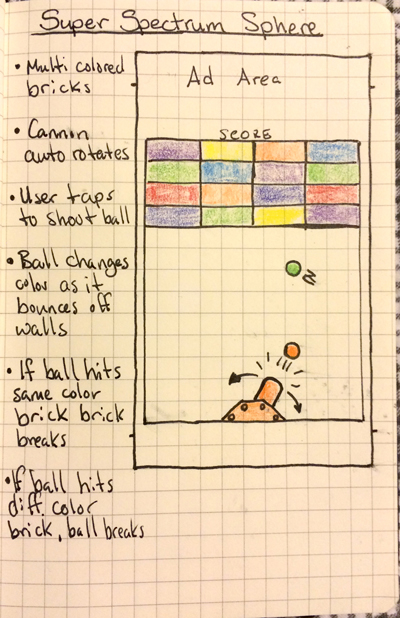
Super Spectrum Sphere sketch

I’m calling this Super Spectrum Sphere. This will be the first app of my own that I actually upload to the app store. It will be submitted for approval before September 30th, 2014.

This game is basically a Breakout variant. The main action is to break bricks with a ball. However, unlike in breakout, you don’t have a paddle to keep the ball bouncing. Instead you have a cannon which oscillates. The player will tap to shoot the ball from the cannon and change the color of the cannon. When the ball emerges it will be the same color that the cannon was when the screen was tapped. If the ball bounces off a wall or the floor its color will change to the next color in the ROYGBIV spectrum. If the ball contacts a brick that is the same color the brick will break and the ball will continue. If the ball contacts a brick that is a different color the ball will break and disappear and the brick will remain.

Multiple balls may be on the screen at the same time, but the fewer balls you use to eliminate all the bricks the higher your score will be.

I like to use a graph paper notebook to sketch out my designs. The screen area outlined in the image above is the approximate size of the screen area of an iPhone 5 or 5S. Older iPhones with smaller screens are about three grid units shorter than that. You may have noticed that I made four small marks on the sides of the screen area. Those mark 1.5 units from the top and bottom, accounting for the screen size difference between older and newer iPhones. I have designed the play area to fit within the space available on older iPhones with room for an ad at the top. The extra space afforded by the larger screen of the 5 and 5S will be taken up by the background graphic of the play frame.

Super Spectrum Sphere will be a free app monetized with ads. I have not yet decided which ad api I will use. I may launch it with Apple’s iAd and re-evaluate after monitoring the performance for a month. I’ve read that the iAd network doesn’t work in some countries.